
Dronetag Mini 4G
Connectivity: Mini 4G uses LTE Cat 1 bis; standard Mini uses LTE-M / NB-IoT.
Form factor: Mini 4G has different dimensions/weight (slightly larger and heavier).
Charging: USB-C on Mini 4G vs Micro-USB on Mini.
Regional variants: Mini 4G comes in two variants, Mini 4G EU and Mini 4G NA, which differ in the supported LTE bands. See Mini 4G EU vs. Mini 4G NA.
SIM options: Choose an integrated SIM (e-shop) or SIM slot (bring your own SIM). The SIM-slot version is ideal for evaluating the full Dronetag solution before bigger decisions. For SIM-slot evaluations or custom SIM integration, contact sales@dronetag.com
Make sure you’re following the right guide for your device to avoid setup hiccups.
Dronetag Mini 4G makes your drone visible to other airspace participants and lets you track it in real time. It mounts on any drone regardless of manufacturer.
Mini 4G connects over the cellular network to our cloud service to meet Network Remote ID (NRI) requirements. It also broadcasts identification and position locally to comply with Direct (Broadcast) Remote ID (DRI) rules. Both NRI and DRI transmissions follow the relevant standards: prEN 4709-002 for the EU and ASTM F3411 for the US.
The device includes internal antennas, an all-day battery, and a durable enclosure with a reclosable 3M Dual Lock mount, so it can run standalone and be quickly moved across drones in your fleet. It works hand in hand with the Dronetag Web & Mobile app for setup, monitoring, and updates.
For demanding RF environments, Mini 4G also provides two MMCX connectors to attach external LTE and Bluetooth antennas, improving signal strength and connection reliability.
Mini 4G EU vs. Mini 4G NA
Dronetag Mini 4G is available in two regional variants. They look the same, are operated the same way and share the same Dronetag App features. The only hardware difference is the LTE modem, which determines the cellular bands the device can use:
| Mini 4G EU | Mini 4G NA | |
|---|---|---|
| Intended region | Europe, Asia and other regions using the bands below | North America |
| LTE bands (LTE-FDD) | 1, 3, 5, 7, 8, 20, 28 | 2, 4, 5, 12, 13, 66 |
Use the variant that matches the region where you fly. The cellular connection (and therefore Network Remote ID and all cloud features) works only on networks that use the LTE bands of your variant. For example, Mini 4G NA will not connect to the cellular network in Europe, and Mini 4G EU will have very limited connectivity in North America.
Direct / Broadcast Remote ID (Bluetooth) does not depend on the LTE modem and works the same on both variants.
Mini 4G EU is not limited to Europe. Its LTE bands are widely used outside Europe as well, so it also works in many Asian countries, for example Malaysia, Singapore, Taiwan, Hong Kong, Thailand, Vietnam, the Philippines, Indonesia, South Korea, Japan, Israel and the United Arab Emirates. Network availability depends on the local operators, so always check the coverage map or contact us before flying in a new country.
Where the behavior of the two variants differs, this guide states it explicitly (for example in Specification and Configuration).
Controls
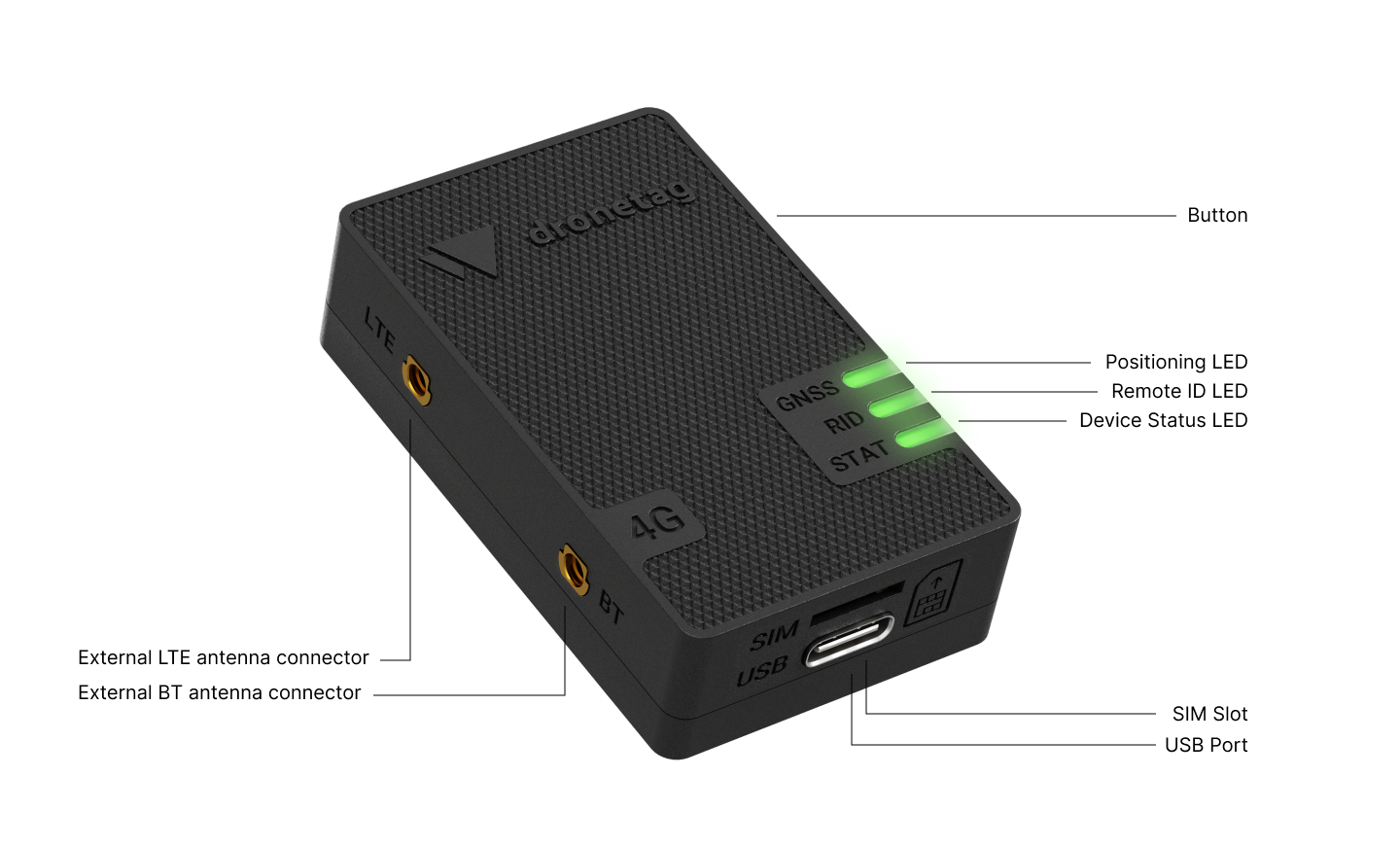
User Interactions
Dronetag Mini 4G is operated with the button located on the longer side of the device.
- Long press (2 s): Switch the device on or off
- Short press (0.1 s): Start flight or end flight (while the device is turned on)
- Short press (0.1 s): Battery indication (while the device is turned off)
- Extra-long press (5-15 s): Force device reset to factory defaults (Press and hold the power button until the LEDs turn purple and the countdown finishes)
General usage
The device usually works in all outdoor areas with a GNSS signal and cellular coverage. To quickly start your flight (assuming that you already registered your device):
- Check the battery level while the device is turned off by a short button press (0.1 s).
- Turn on the device by long-pressing the button (2 s).
- Wait until all device components are ready and 3 LEDs transition to solid green.
- The flight will start automatically, or you need to confirm it with a short button press (based on your Flight auto start configuration).
- Do your mission.
- End the flight by a short button press (0.1 s).
- Switch off the device by a long button press (2 s).
What's in the Box
After the Mini 4G is delivered to you, the following package contents should be present:
- 1 × Dronetag Mini 4G
- 1 × USB-C cable
- 3 × Dual Lock counterpart for drone
- 1 × Alcohol cleaning pad
- 1 × Quick start guide
- 1 × Dronetag sticker
Network Remote ID vs. Direct/Broadcast Remote ID
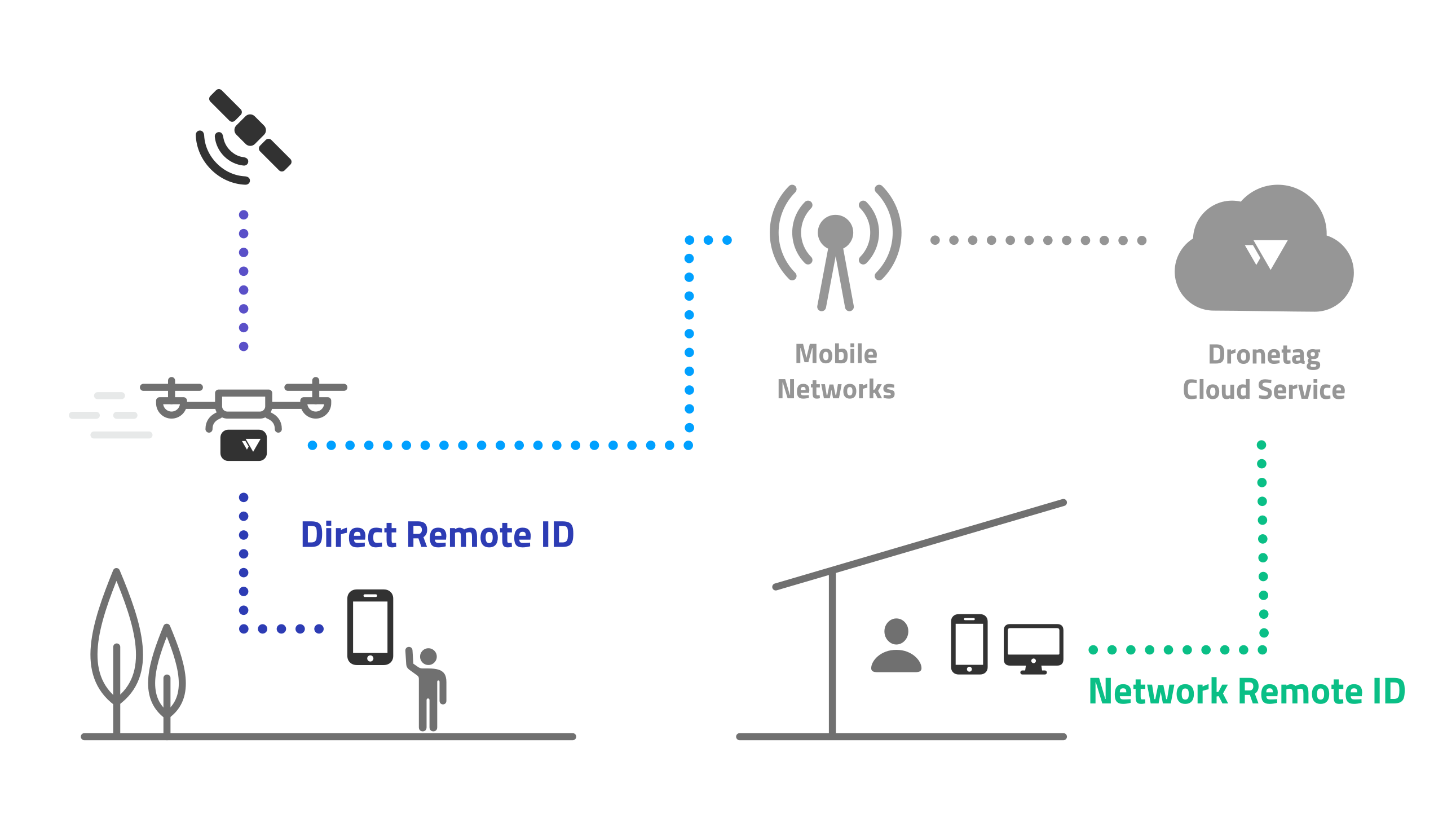
Connectivity & SIM options
Mini 4G includes an embedded Emnify MFF2 SIM (chip SIM). LTE connectivity works with an active subscription, which covers both Cloud features and cellular data.
Nano-SIM slot: Mini 4G also provides a nano-SIM slot. You can insert your own SIM, and the device will use your SIM for LTE connectivity instead of the embedded one.
If you use your own SIM, make sure your operator's network uses LTE bands supported by your Mini 4G variant (EU: 1, 3, 5, 7, 8, 20, 28; NA: 2, 4, 5, 12, 13, 66).