
Subscriptions for Transmitters
- Document
- Dronetag App — Subscriptions for Transmitters
- Chapters
- 3
- Source
- help.dronetag.cz/print/dronetag-app/subscriptions/transmitters
Activating a subscription plan
Our subscription plans can be activated in our mobile & web app. To activate a subscription plan, you will need to have registered a Dronetag account.
Before you go purchase a subscription, check if you don't have an available trial. You can check this by navigating to the Profile and then My devices. Select the device for which you might have the trial available. On the device detail you will see the option to activate the trial. If you have multiple devices, you can check the trial eligibility in Profile → Account → Manage subscription.
Purchasing a new plan
Navigate to the Profile screen, tap on the account card, which will get you to the Account screen. On this screen, select Manage subscription. You will see a list of available subscription plans. Tap on the plan you want to purchase and follow the instructions.
You will be redirected to the payment page. Enter your credit card details. Be aware that unless you cancel the subscription, this credit card will be charged automatically monthly or yearly, depending on the plan you have chosen.
After you complete the payment, you will be redirected back to the app. Your subscription will be activated immediately, check your profile to see that the subscription is active.
If not, please give it a few minutes and try again. If you still cannot see the subscription active after a few minutes, check if the payment went through and was not denied. In either case, you can contact us at support@dronetag.cz.
Payment methods
You can pay for your subscription using a credit card, PayPal, Apple Pay or Google Pay. We use Stripe to process credit card payments. We do not store any credit card information on our servers.
Changing or renewing your plan
You can change your subscription plan at any time. See the ‘Changing the plan’ section for more information on how to do that.
If you previously canceled your subscription, you can renew it at any time. See the ‘Renewing the plan’ section for more.
Cancelling your subscription
At Dronetag, we understand that your needs may evolve, and circumstances can change. Therefore, we've made the process of unsubscribing straightforward, ensuring you have the flexibility to manage your subscription at any time.
How to cancel your subscription
You can cancel your subscription at any time. Cancelling your subscription will prevent any future charges to your credit card.
Don't worry, you will still have access to your subscription until the end of your current billing period.
Follow these steps to cancel your subscription:
- Login to your Dronetag account
- Access your account via our web or mobile app
- Navigate to the Subscription page
- First, open the Profile page by tapping the button in the top-right corner on the app's main screen
- Then, tap the profile card with your name to get to the Account page
- Finally, tap the Manage subscription button
- Select “Cancel your current plan”
You will be redirected to the Stripe portal. Follow the instructions to cancel your subscription.
If you do not have any overdue invoices, you can cancel the plan by tapping the Cancel plan button. After you confirm the cancellation, you can return back to the Dronetag app. You will still see the same plan active until the end of the current billing period.
Renewing the plan
If you change your mind, you can renew your subscription at any time. You can do so by tapping the Renew plan button on the Subscription page. In some cases, you might be redirected to the Stripe portal to confirm the renewal. Follow the instructions to renew your subscription.
Checking the status and usage
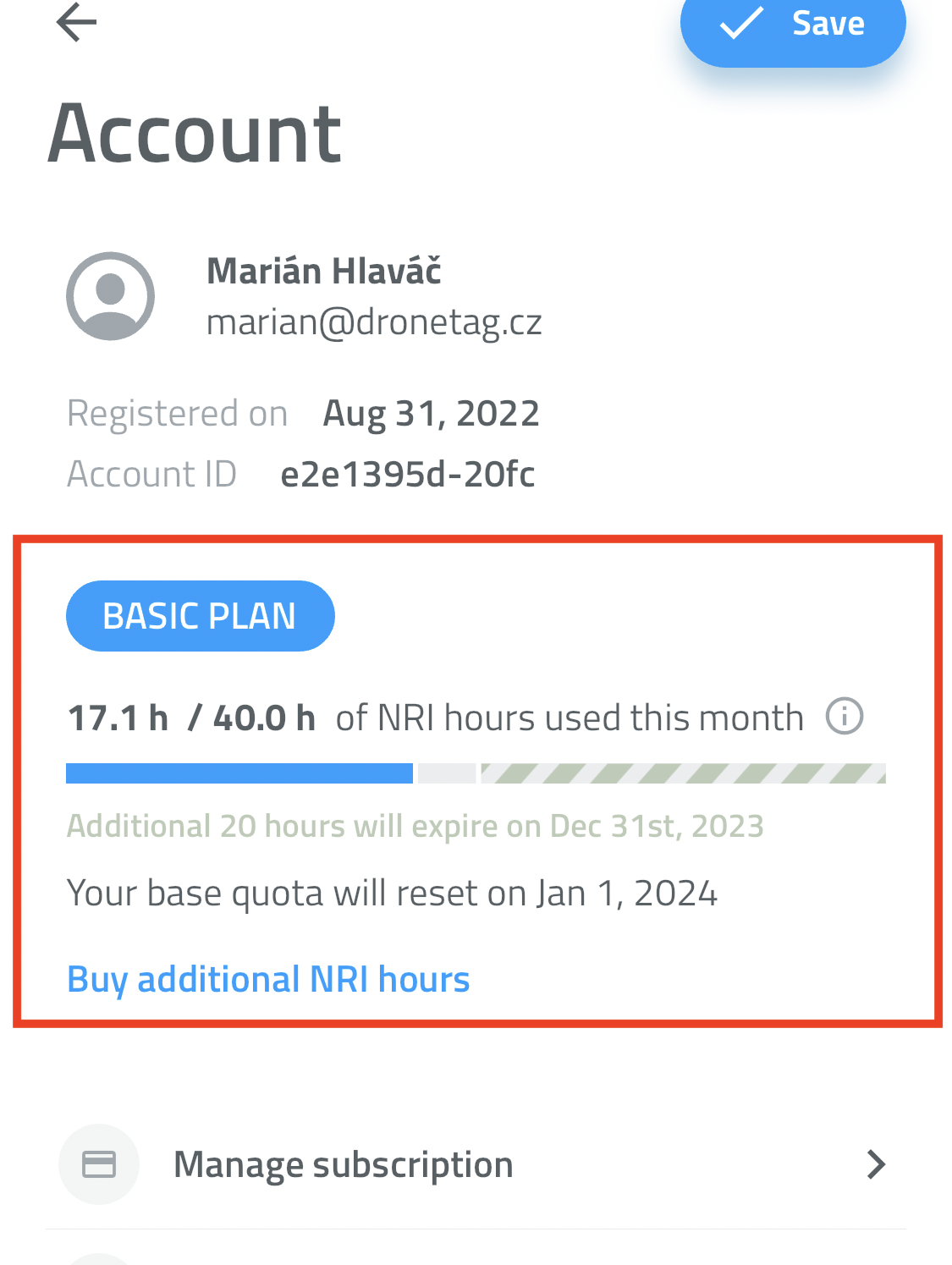
The current state of your subscription and flight hours usage can be checked in our mobile & web app.
Open the Profile screen and tap on the profile card with your name to get to the Account screen. There you can see the current state of your subscription and flight hours usage for the current billing period.
The simple chart visualizes the usage of your flight hours. The blue part represents the flight hours that you have used up, the grey part represents the flight hours that you have not used up yet, and the green part represents the additional flight hours that you have purchased and not used up yet.
What are NRI hours?
NRI stands for Network Remote ID, and "NRI hours" is the monthly limit of the number of hours that you can use your Dronetag over the network. However, this limit does not apply to the usage of your Dronetag over Bluetooth. You can use your Dronetag over Bluetooth as much as you want.
What happens when flight hours are used up
When you have used up all your flight hours, you will not be able to fly your drone until the quota gets renewed at the beginning of the next billing period.
If you need to continue flying this month, you'll need to upgrade your plan or buy additional NRI hours.
Buying additional flight hours
You can purchase additional flight hours by tapping the Buy additional NRI hours button on the Account screen. You will be redirected to the Stripe portal to complete the purchase. After you complete the purchase, you can return back to the Dronetag app. You will see the additional flight hours added to your account.
Notice that the additional flight hours have a separate expiry date. They do not expire at the end of the current billing period, but at their own expiry date.
Example: On January 15th you exhausted all your 20 flight hours. You purchased an additional 20 hours. Your billing period ends on January 31st, but the additional 20 hours expire on February 15th.
Changing the plan
Changing the plan can get complicated, but we're trying to make it as easy as possible. You can switch the subscription right away and use the features from the new plan immediately.
You can change your subscription plan anytime. If you change your plan, the next billing period you will be charged for the new plan together with a prorated amount for the remainder of the current month based on the new plan's pricing.
Questions & support
If you have any questions or concerns regarding the subscription, please don't hesitate to contact us. We're here to ensure your Dronetag experience is as seamless as possible.
Visit our contact page if you wish to get in touch with us.
Source pages
Every chapter of this document is a page of the Dronetag help site. Use these addresses to reach the latest version.
- 1Activating a subscription planhelp.dronetag.cz/dronetag-app/subscriptions/transmitters/activating
- 2Cancelling your subscriptionhelp.dronetag.cz/dronetag-app/subscriptions/transmitters/cancelling
- 3Checking the status and usagehelp.dronetag.cz/dronetag-app/subscriptions/transmitters/usage