
DRI GNSS
The Dronetag DRI module can run one of two firmware variants: the standard DRI firmware (used throughout the rest of this Integration Guide) or DRI GNSS. Both run on the exact same physical hardware - switching between them is a firmware choice made from the Dronetag app, and it's fully reversible at any time.
Looking for the Compliance Mode or MAVLink Integration Type settings? Those apply only to standard DRI firmware - see Compliance Mode. DRI GNSS firmware doesn't use MAVLink at all, so neither setting exists there.
When to use DRI GNSS
Standard DRI firmware expects a MAVLink-speaking flight controller (ArduPilot, PX4, etc.) to provide it with position, pressure, and identification data - see the rest of this guide for that setup.
DRI GNSS firmware is for the opposite situation: your flight controller doesn't provide any of that - for example, an FPV/racing build running Betaflight, or any other flight controller that doesn't speak MAVLink. In this mode, the DRI gets its position directly from an external u-blox GNSS receiver connected to its Forward port, instead of from a flight controller.
What DRI GNSS firmware enables
- Uses data from a u-blox GNSS receiver - plug an external u-blox module into the DRI's Forward port, and the DRI reads position from it directly.
- Can upload GNSS assisted data (AGNSS) to the receiver - connect a GNSS configuration tool to the DRI's Controller port to speed up the receiver's time-to-first-fix.
- Forwards data to your flight controller (e.g., Betaflight) - the GNSS receiver's data is relayed out the Controller port, so a flight controller wired there sees the same data it would if the GNSS receiver were connected to it directly.
Wiring
- Forward port → external u-blox GNSS receiver
- Controller port → your flight controller (receives the relayed GNSS data), and/or a laptop/GNSS configuration tool for AGNSS upload
Switching between DRI and DRI GNSS
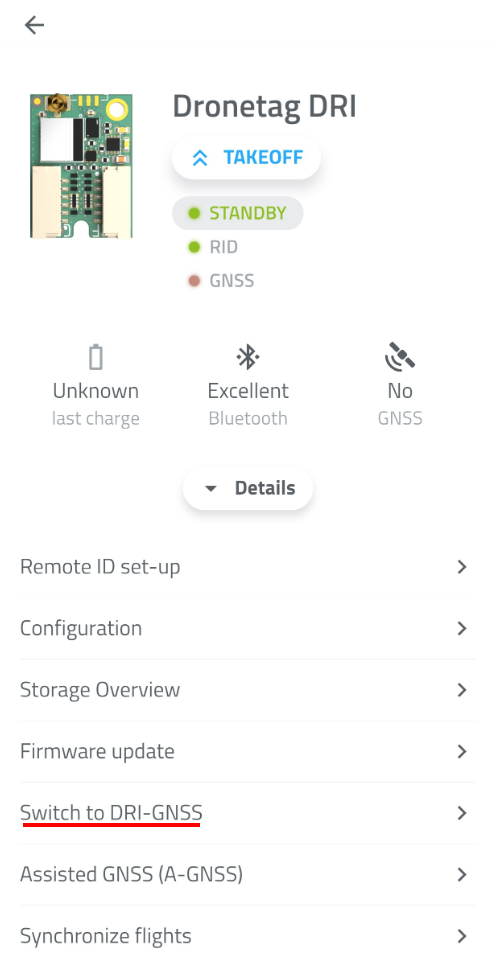
Switching is done from the Dronetag app and performs a firmware update on the device. You can switch back to standard DRI firmware the same way, at any time - nothing is one-way.
Switching to DRI GNSS
The Dronetag app shows the following when switching a standard DRI to the GNSS variant:
Switch to Dronetag DRI GNSS
Your Dronetag DRI can be switched to Dronetag DRI-GNSS variant. Switch between the variants to adapt to your specific needs. Both variants provide the Remote ID functionality in different ways.
Switching to DRI-GNSS variant will enable the following features:
- Uses data from a Ublox GNSS receiver.
- Can upload GNSS assisted data to the receiver.
- Forwards data to your flight controller (e.g., Betaflight).
Switching will perform a special firmware update on your device. The switch is reversible by visiting this screen again.
Switching back to standard DRI
Switch to Dronetag DRI Module
Your Dronetag DRI-GNSS can be switched to Dronetag DRI variant. Switch between the variants to adapt to your specific needs. Both variants provide the Remote ID functionality in different ways.
Switching to original DRI variant will enable the following features:
- Integrates with Mavlink flight controllers.
- Uses data from the flight controller.
Switching will perform a special firmware update on your device. The switch is reversible by visiting this screen again.