
Funkce detailně
- Document
- Dronetag App — Funkce detailně
- Chapters
- 10
- Source
- help.dronetag.cz/cs/print/dronetag-app/functions
Detection Detail & Search Improvements
All features described below are available in the Dronetag App starting from version v2.167.1, with additional updates in v2.170.2.
These features focus on detection visibility, playback, and data clarity for RIDER and Scout users.
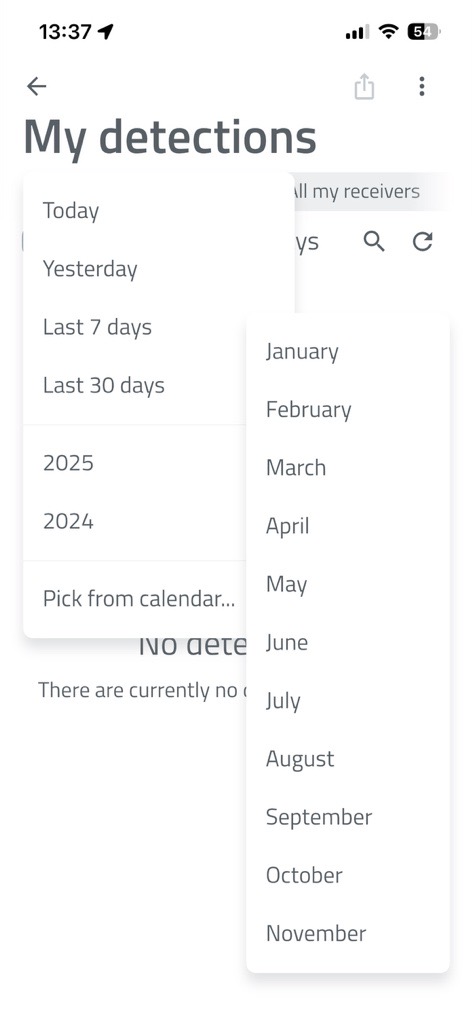
Improved Filtering in "My Detections"
The filtering panel includes:
- Quick-select dropdown for entire months
- Display of "X of X detections found" during searches
How to Set Advanced Detection Filters in the Dronetag App
📱 Step-by-Step Guide
-
Open the Dronetag App and go to Profile > My Detections.
-
On this page, you will see basic filtering options:
- Filter by date
- Filter by receiver that detected the drone (RIDER or Scout)
- Filter by drone status (Seen / Unseen)
-
For advanced filtering, tap the three-dot button in the top right corner.
-
A panel will open where you can set minimum and maximum values for:
-
UA – Sensor Distance
Distance between the detected drone and the receiver (RIDER or Scout). -
Relative Height (ATO)
Drone height relative to the take-off point. -
UA – Operator Distance
Distance between the drone and its operator.
-
-
After setting your desired values, tap the Apply Filters button.
The app will then display only the detections that match your selected criteria.
Server-Side Search in Detections
- The search happens on the server for faster and more efficient results.
- You can find specific drones that flew by weeks ago without downloading everything first.
Reception Technology Display
- The app shows which reception technology received the data - such as Bluetooth, Wi-Fi, or ADS-B.
- This is especially useful for Scout units with ADS-B support.
Detection Detail: Receiver Positions
- The detection detail screen lists all receivers that participated in a detection.
- Detailed timing (which receiver caught which packet).
Detection History & Trajectory Loading
- Trajectory loading features a progress bar at the top, showing how much data has been loaded and how long it may take.
- This makes it clear to users what is happening during data retrieval.
Detection Detail View
- The app has detection detail view with an integrated player.
- You can replay an entire operation from the start and selectively hide telemetry types (for example, hide operator movement).
- The screen also includes summary information and allows you to export or delete detections directly from the app.
Seen vs. New Detections
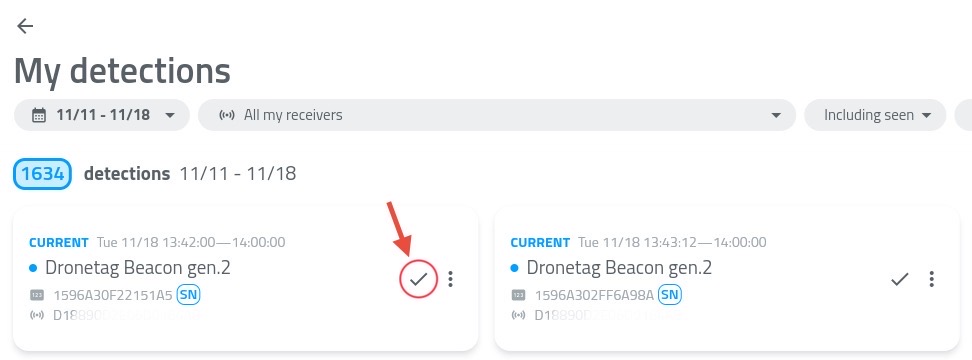
- The detections list now visually distinguishes between seen and new detections.
- You can mark a detection as "seen" to ignore it in the future.
Use the checkmark button highlighted in the picture.
How to Export and Visualize Detections
The Dronetag App allows you to record and review drone detection history. For a more detailed, 3D spatial review of flight paths (such as navigating through urban landscapes or verifying antenna tests), you can export your detection data and visualize it using external tools like Google Earth.
1. Exporting Detections from the Dronetag App
To export a specific flight or detection history:
- Open the Dronetag App and log in to your receiver's account.
- Navigate to the Detections tab.
- Select the specific detection or flight session you wish to export.
- Click the Export button and choose the KML format.
- Save the generated file to your device.
Pro Tip – Bulk Export
Need to analyze multiple flights at once? You can select multiple detections from the list and export them together into a single combined KML file.
This allows you to visualize and compare several flight paths simultaneously in Google Earth.
Why KML?
KML (Keyhole Markup Language) is the standard format for displaying geographic data in Earth browsers.
Dronetag uses advanced KML elements, specifically gx:Track, to ensure high-fidelity flight telemetry while maintaining the exact path, altitude, and timestamps of the drone.
2. Visualizing Detections in Google Earth
Google Earth is the recommended platform to visualize Dronetag KML exports. It renders the 3D space accurately, which is especially useful when analyzing flights in complex environments such as dense urban areas or between skyscrapers.
Option A – Google Earth Pro (Desktop) — Recommended
The desktop version of Google Earth provides the most robust support for 3D flight paths.
- Download and install Google Earth Pro for desktop.
- Open the application.
- Navigate to
File → Open... - Select your exported Dronetag KML file.
- The flight path will automatically render, allowing you to pan, tilt, and explore the drone route in full 3D.
Option B – Google Earth Web (Browser Version)
If you prefer using the browser-based version of Google Earth, you can still visualize your detections. However, due to limitations in how the web version parses gx:Track data, a specific import method must be used.
Important for Google Earth Web users
Do not use the standard “Import KML” button.
The web parser may fail to properly interpret gx:Track elements when imported this way, which can result in an invisible or broken flight path.
- Open:
https://earth.google.com/web/ - Navigate to the Projects tab in the left-hand menu.
- Click Open (or New Project).
- Select Open KML file from computer.
- Choose your exported KML file.
Google Earth Web should now correctly parse the gx:Track element and display the full 3D flight path.
Detection KML export for testing
Want to try opening a detection in Google Earth but don't have your own file? Download a test KML file - the same that is used in the video above.
3. Example Use Cases
Urban Environment Analysis
Visualize exactly how a drone navigated through a city environment, including altitude clearance above buildings and proximity to skyscrapers.
Hardware Testing
Review flight paths to analyze signal strength and coordinate accuracy during antenna or hardware testing.
Compliance & Auditing
Maintain a precise visual 3D record of compliant flights for operational logging and auditing purposes.
Push Notifications
Make sure you're on the 2.227.0 app version or newer to access these features.
Dronetag app provides a range of notifications to keep you informed about your devices, flights, and airspace activity.
These include standard app notifications, such as device status or flight alerts, as well as Push Notifications for drone detection, which allow you to receive alerts even when the app is not actively running.
Detection Notifications
The Push Notifications system for drone detection devices supports Dronetag Scout and Dronetag RIDER, and lets you receive alerts even when the app is running in the background on iOS, Android, and Web.
Once enabled, you can set up your Scout or RIDER, close the app, and still be notified when a new aircraft is detected.
How to enable Detection Notifications
Before push notifications can work correctly, you first need to allow the Dronetag application to send notifications on your device.
For the web application, you also need to allow notifications in your web browser settings.
The Dronetag app should normally request this permission automatically on first use. However, it is possible that:
- the permission request was previously denied
- notifications are blocked by your browser settings
- notifications are restricted by company or system policies on your computer
Chrome
Settings → Privacy and security → Site Settings → Notifications
Edge
Settings → Privacy, search, and services → Site permissions → All permissions → Notifications
Firefox
Settings → Privacy & Security → Notifications
Safari
Settings → Websites → Notifications
1. Update the app to v2.227.0 or newer.
2. Navigate to Notifications settings

3. Open Notification settings and tap the blue Upgrade box.
- If the blue box is not visible, log out and log back in to refresh your account settings.

4. App will confirm the setup process was successful:

5. Now check the notifications setup is set to your actual needs.
- Push Notifications are available on Web, iOS, and Android.
- If you are signed in on multiple devices, you can enable notifications on each one independently.
- Make sure OS notification permissions are granted before enabling notifications in the app.
List of features
Find a detailed list of detection-related features below:
Notification Regions
Notification regions let you limit detection alerts to specific geographic areas. For example, you can define a region around a building and only receive alerts when a drone is detected within that area.
The app does not yet include a built-in visual editor for regions in early access. We recommend using geojson.io to create and edit regions – you can draw a polygon or circle, export it as GeoJSON, and paste the result into the app.
How to set up a notification region:
- Open Notification settings.
- Select Manage notification regions.
- Tap the + button to add a new region.
- Enter a name for the region and paste the GeoJSON content into the text field.
- Tap Save.
- ☝️ Enable the "Restrict notifications to defined regions" toggle in Notification settings. This is the main switch that controls whether your defined regions are applied – without it, you will receive notifications from all areas regardless of any regions you have set up.
You can edit, temporarily disable, or delete regions at any time. All regions are also shown on the map for easy reference.
Enabling "Restrict notifications to defined regions" applies globally. If a device has no specific regions defined, it will stop sending notifications entirely. Ensure all your devices have designated regions to maintain coverage.
Ignore Lists
The ignore list lets you suppress notifications for specific drones. Once a UAS ID, most often a drone or module serial number, is added, you will no longer receive alerts for that drone.
How to add a drone to the ignore list:
- Open Notification settings.
- Select Manage ignored UAS IDs.
- Enter the UAS ID, usually the drone serial number, and tap Add to ignore list.
You can add as many UAS IDs as needed and remove them at any time.
Sound and Visual Effects
Detection notifications produce in-app sound and visual effects on your device while the app is open, similar to the older Alerts functionality.
To configure these effects, tap the preferences icon next to the New detection alerts category in Notification settings.
When the app is closed, the notification sound follows your system settings.
Notifications history
You can view past detection alerts in the Notification history screen for later review.
Other Notifications in Dronetag App
In addition to detection alerts, the app provides several other notification types to keep you informed about your devices and operations.
Shared Devices Notifications
Receive updates related to devices shared with you. This includes activity and events from devices operated by other users within your shared environment.
Detection Notifications
Get notified whenever a new aircraft is detected in your vicinity when using the app in the foreground.
NRI Flight Notifications
Notifications related to your own flights using Network Remote ID devices.
- Proximity alerts – when another aircraft gets too close
- Altitude alerts – when your device exceeds a defined altitude threshold, for example 120 m
Device Notifications
Stay informed about the status of your devices.
- Low battery warning – when a device is running low on battery
- Error status – when a device encounters an issue
Account Notifications
Updates related to your account, such as changes in settings or important account-related events.
This feature is still in development and may be unstable.
If you encounter any issues or have feedback, please contact your representative or reach out to our support team.
We are continuing to expand the Push Notifications system. Coming soon:
- ⭐️ SMS & e-mail notifications
- Visual editor for notification regions
- Sharing notification regions with other users
Device Data Sharing
Available in the Dronetag App starting from version v2.167.1, with follow-up improvements in v2.170.2.
In the Dronetag app, you can share live data from your Dronetag RIDER, Dronetag Scout, or even Dronetag Mini 4G device with another user who also has a Dronetag account.
This allows them to see your device in their list and view its current position on the map in the app.
You’ll see all detections in your Detections history, starting from the day you got access to the shared data.
Device Sharing from the App
- Devices (Mini 4G, RIDER, Scout) can be shared directly from the app.
- Once shared, the invited account immediately sees new detections and flight data from the shared device.
- This makes collaboration and multi-account operations much smoother.
💡 How to Share Live Data
Here’s how to start your first live sharing session.
You can configure your RIDER or Scout directly from the app and watch detections appear in real time.
📱 How to Start Sharing
You can share data either in the Dronetag mobile app or in the Dronetag Web App:
- Go to Profile → My Devices.
- Select your Dronetag RIDER or Dronetag Scout.
- Tap Share data with others.
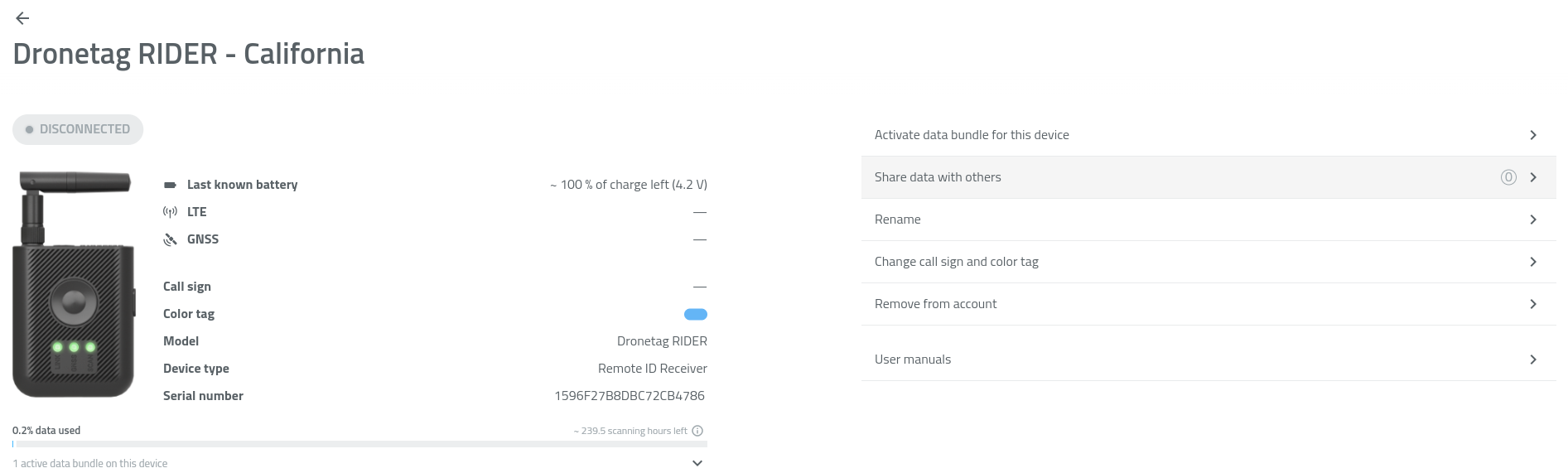
- Tap + Add more.
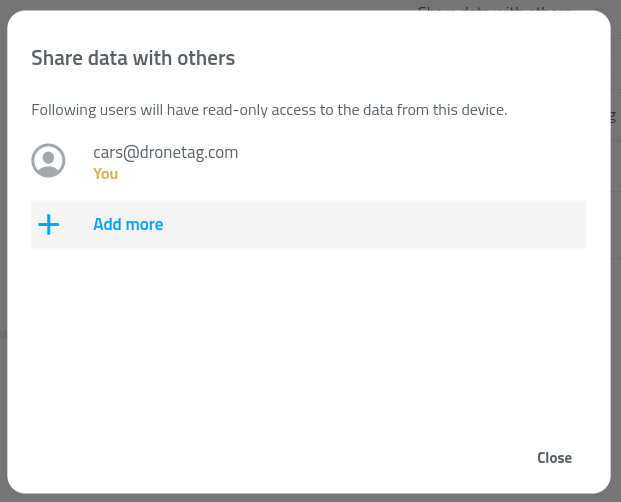
- Enter the email address of the user (the email must be registered in the Dronetag app).
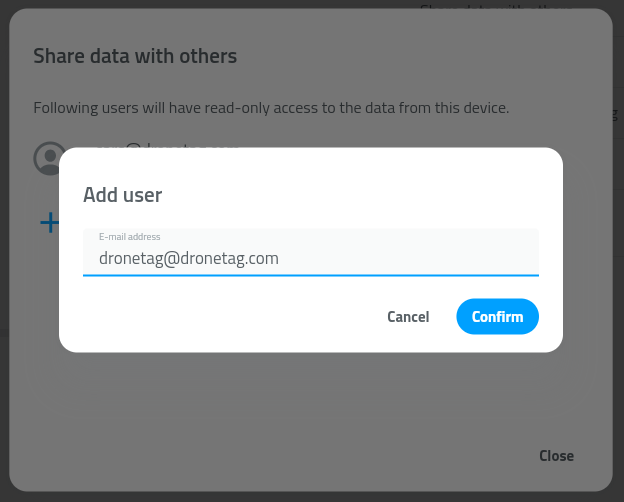
- Confirm by tapping Confirm.
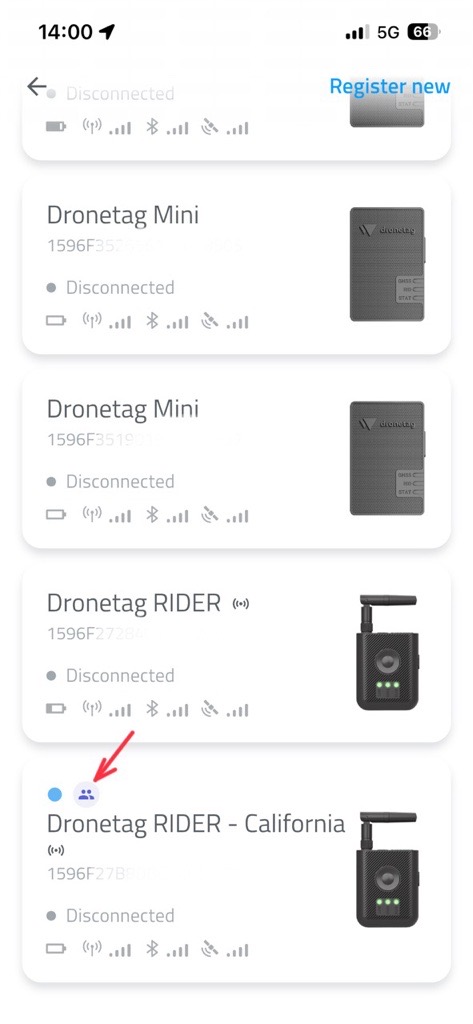
✅ The selected user will now see your RIDER or Scout under My Devices, marked with a shared-device icon.
They will also see the device’s live position on their map in the app.
🗑️ How to Stop Sharing
To remove sharing with a specific user:
- Go to Profile → My Devices.
- Select your Dronetag RIDER or Dronetag Scout.
- Tap Share data with others.
- Find the user in the list of accounts.
- Tap the trash bin icon next to their name.
- Confirm by tapping Delete.
⚙️ Data Sharing Limitations & Future Improvements
While the data sharing feature makes it easy to collaborate across multiple accounts and devices, there are several current limitations to be aware of.
🚧 Current Limitations
-
Device status is not shared
- When you share a device with another account, the recipient does not see the device’s live status (online / in-flight / scanning / offline).
- They will still receive new detection and telemetry data in real time, but the status will remain displayed as offline.
- This behavior is known and will be addressed in a future update.
-
Invalid account error handling
- When entering an email address or account that does not exist, the app currently returns an error message.
- Make sure to double-check that the entered email corresponds to a valid Dronetag account before confirming the share action.
-
Historical data is not shared
- Shared users only receive newly collected data from the moment sharing begins.
- Historical detections or flight logs are not included in the share.
- This limitation also applies if you later re-enable or remove sharing for the same account.
🔭 Future Improvements
We plan to extend the Data Sharing feature with additional functionality in upcoming updates, including:
- Shared access to historical data (detections, flights, telemetry)
- Improved handling of invalid or inactive accounts
- Live synchronization of device status for shared users
Map Features & Performance Updates
All features and improvements described below are available in the Dronetag App starting from version v2.180.4.
This feature brings significant improvements to how maps work in the Dronetag app — including brand new official flight grid layers and smoother overall map handling.
Map Layers – Official Flight Grids for US and Czech Republic
- This feature brings support for additional map layers.
- We’re starting with flight grid overlays for the United States and the Czech Republic, based on official data sources from FAA and ŘLP.
- These datasets are updated automatically on a regular basis, ensuring you always have the latest airspace information available.
How to Enable Map Layers
🗺️ To enable a map layer in the app:
- Open the Dronetag App.
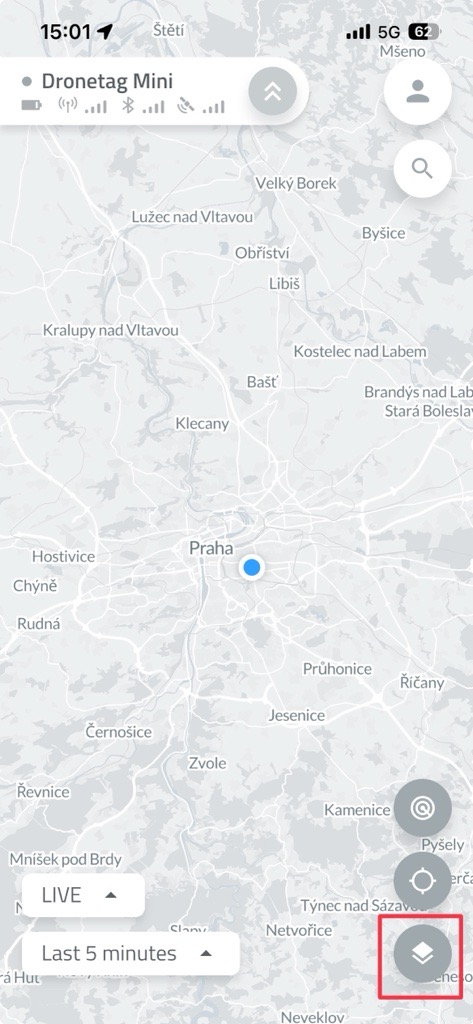
- On the Home screen, tap the two overlapping squares icon (as shown in the image).
-
Scroll down to the list of available layers.
-
Select the layers you want to display by toggling them on.
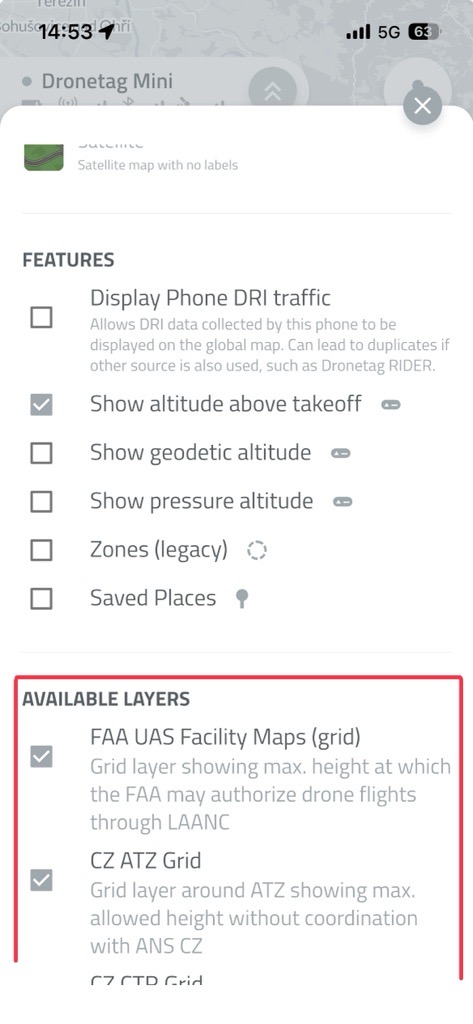
- The selected layers will now appear on your map view.
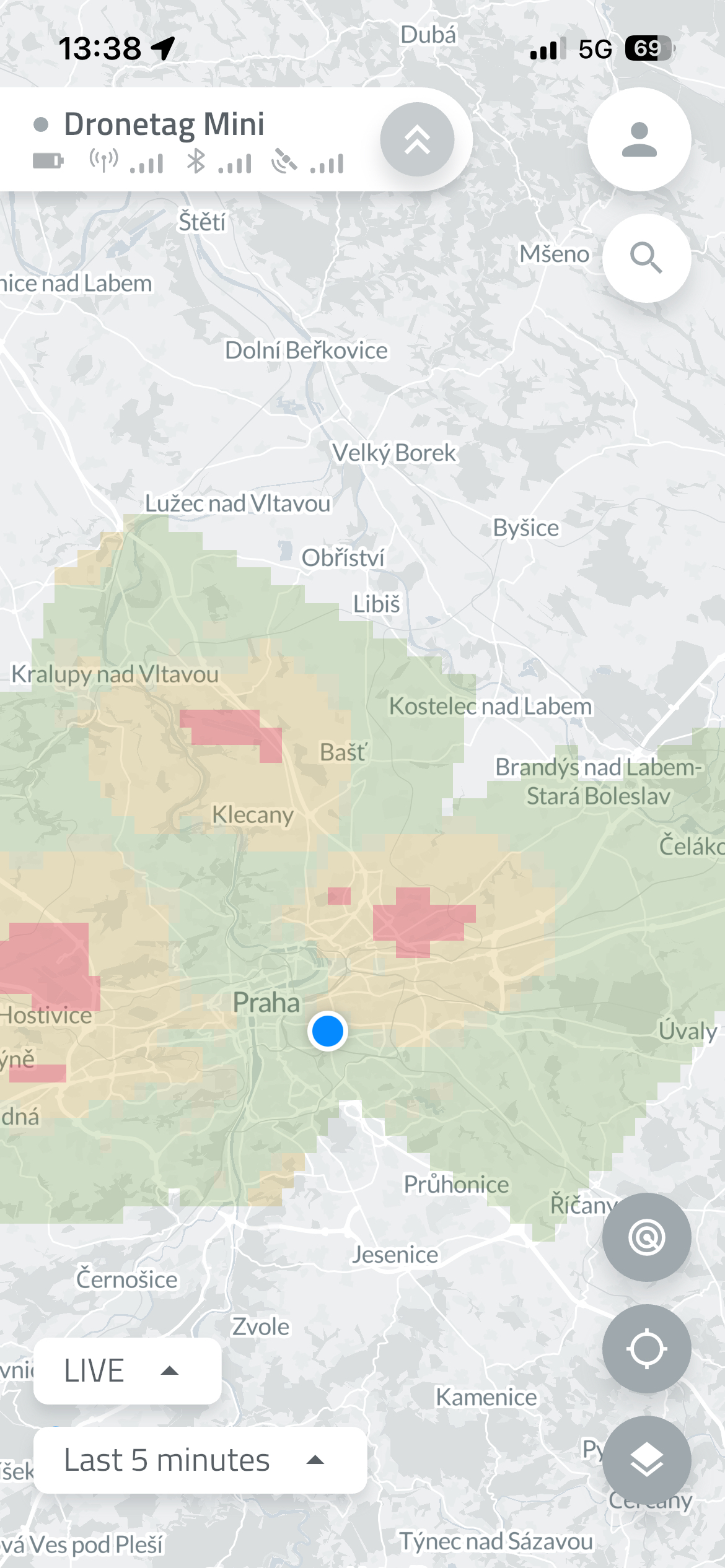
You can enable multiple layers at once - the map will automatically adjust to show all relevant information.
Smart Map Settings Panel
- The map settings panel intelligently shows only relevant overlays for your region.
(Exception: for the US, the FAA dataset currently covers almost the whole planet — we’re working on smarter filtering there.)
Improved Map Loading Performance
- The map loading process has been refined — no more unnecessary reloads after every move!
- The app refreshes map data only when you make a large zoom-out or move far away from your current position.
Safe Restarts and Firmware Updates
- Devices can only restart or update firmware while in flight.
- This prevents firmware issues during active operation.
(Does not apply to Dronetag RIDER while scanning.)
Integration Portal Update
- The integration portal supports empty payloads.
- Some partners use this feature to verify integration functionality even when no telemetry data is available.
Known Aircraft
Known Aircraft lets you identify and keep notes on drones you have detected before, so you don't have to rely on remembering their serial numbers.
You can assign a color tag, set an affiliation, and add your own note to any known drone. Once saved, this information is associated with the drone's serial number and can be viewed whenever the drone is detected again.
How to add a Known Aircraft
There are three ways to add a drone to Known Aircraft:
1. From the Profile page
Go to your Profile and select Known Aircraft. Tap Add Known Aircraft and enter the drone's serial number. You can then add a color tag, affiliation, and note.
2. From a live detection
You can also add a drone directly while viewing a live detection. Open the detected drone's details and select add a color, affilitation or note.
3. From My Detections
Known Aircraft can also be created from a previously recorded detection. Open My Detections, select detection with the drone you want to identify, scroll down to aircraft detail and add a color, affilitation or note.
Known Aircraft is about identifying and annotating drones. It lets you add a color tag, affiliation, and personal notes so you can recognize and keep context about drones you have detected before.
Whitelisting is about notifications. Whitelisted drones remain saved, but notifications for their detections are suppressed.
In short:
- Known Aircraft → Who/what is this drone? Add color tags, affiliation, and notes.
- Whitelisting → Should I be notified about this drone? Disable notifications for saved drones.
Label and Color for Detections
The Label and Color feature allows you to assign a custom tag and color to any device detected in the app based on its serial number or identifier. For aviation receivers, this function can also be used to label planes and other aircraft.
There are multiple ways to do this:
From the Map View
Simply click on the device icon and assign your preferred label and color.
From the Detection View
Open any detection log or list view to apply the same customizations.
Once applied, these visual identifiers persist across the app, making it easier to instantly track and categorize specific drones, controllers, or aircraft.
This setting works as an overlay and changes the label and color throughout the entire app for both live and historical data.
If you are using a Dronetag Mini as an NRI flight transmitter, it is recommended not to use this function together with the Color Tag and Call-sign features available in the My Devices menu.
If both are configured, the new Label and Color setting will take precedence and be displayed throughout the application.
Example Use Cases
1. Tracking Repetitive Intruders or Chronic Offenders
If a specific drone (identified by its unique serial number) repeatedly scouts a perimeter over several days, operators can label it "Repeat Offender – Scouting" and assign it an Orange color.
This immediately alerts the security team when the drone reappears, indicating that this is not a one-time hobbyist flight but a recurring surveillance threat.
2. Distinguishing Known "Friendly" Drones from Unknown Threats
In commercial facilities or secure sites, security teams often operate their own drones for inspections, patrols, or maintenance tasks.
By labeling these internal devices as "Friendly – Inspection" and assigning them a Green color, operators can quickly ignore known activity and focus on unclassified or suspicious detections.
This helps teams concentrate on unauthorized drone activity instead of reviewing their own operations.
3. Multi-Agency Coordination
During large public events such as stadium concerts, festivals, or political rallies, multiple organizations may be authorized to operate drones simultaneously.
Operators can assign different colors to drone serial numbers based on the responsible organization:
- Blue – Law Enforcement
- Yellow – Approved Media
- Purple – Event Production Teams
This provides clear airspace awareness and helps prevent authorized partner drones from being mistakenly reported as threats.
Flight Synchronization
This feature allows the user to keep flight logs and history even when the device is not connected to the cloud or doesn't have network & cloud capabilities. On this page, you will learn how to enable and use this function and how it works.
The function in the Dronetag app utilizes the new flight store function available on the latest Dronetag devices firmware, which can store flight data locally. Before you start using this feature, please ensure you have the latest version of the Dronetag App installed on your phone (2.82.0 and later) and that your Dronetag device is updated to the newest firmware version.
How to enable the function
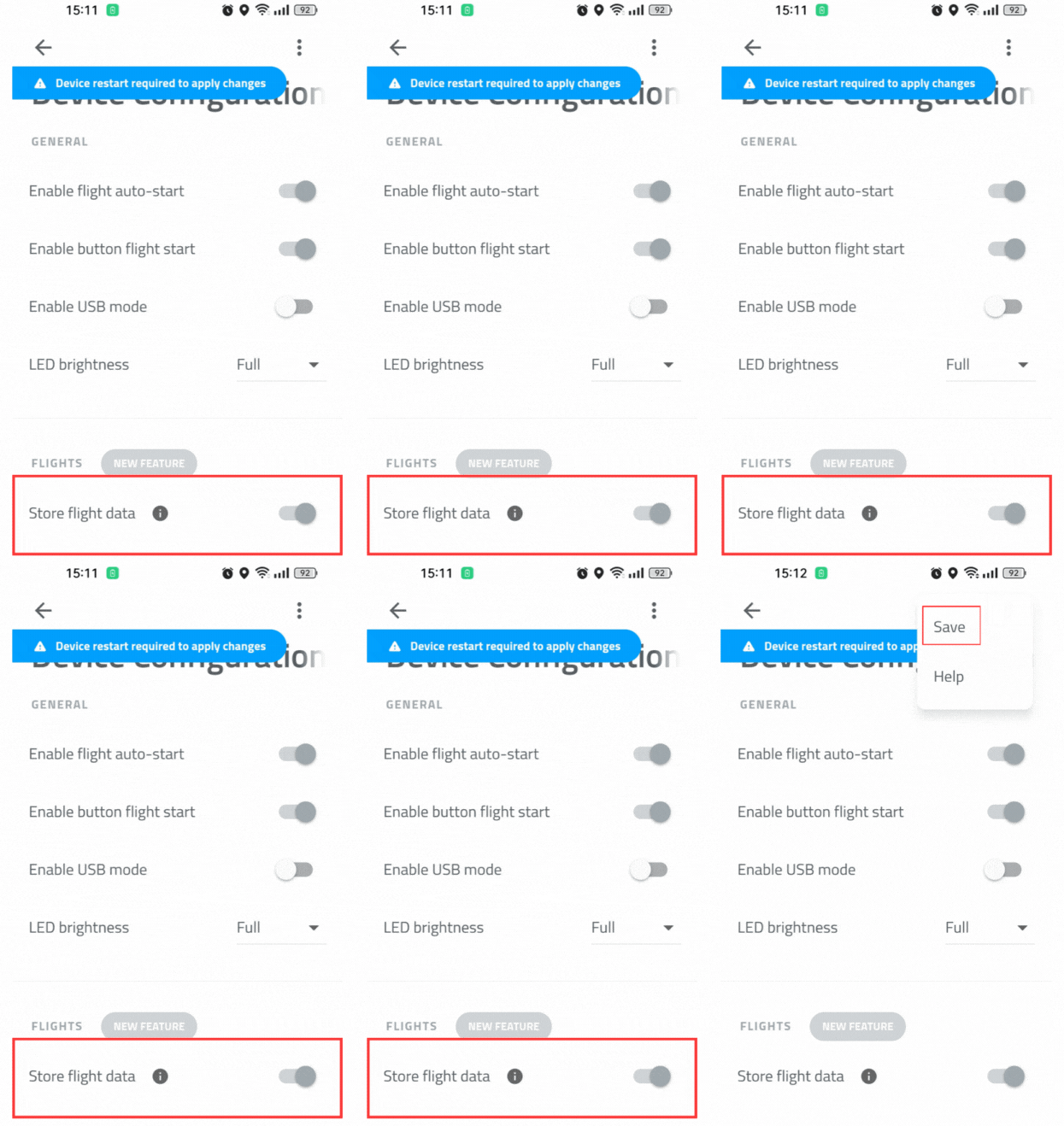
Updating your device to the latest version will automatically enable the flight store on your device. But it's best to check if the function is enabled using the following steps:
To enable the function, turn on your Dronetag device, open the Dronetag App, and navigate to "My Devices". On the device detail, navigate to "Configuration" and check that the "Enable flight store" toggle is enabled. Save the updated settings by Menu and Save, then restart the device.
You're now ready to perform flights with your Dronetag device. The flight data will be stored locally on the device's flash memory, which you can synchronize in the app later.
If you cannot find the "Enable flight store" configuration item, please check you're using the latest version of Dronetag App, you have the latest firmware installed and your device supports the function.
How to synchronize the flights
After enabling the function, your latest flights should now be stored in the device's memory and can be synchronized using your phone to the cloud platform.
To synchronize your flights, turn on your Dronetag device, open the Dronetag App, and navigate to "My Devices". On the device detail, navigate to "Synchronize flights" which will download the list of data available on your device. This action will not synchronize the data yet.
After you tap the "Synchronize all flight data" button, the synchronization process will begin. During the synchronization, please do not turn off your device or close the app.
Keep in mind that after the data are synchronized, they will be deleted from the device's memory to free up space for new flights and make the next synchronization more effective. If you use both Dronetag App and Dronetag Toolbox, we recommend synchronizing the data only in one of the apps.
After the process finishes, you should see the synchronized flights in the "My Flights" section of the app. The flights are now available on the cloud platform, and you can view them on the web app as well.
If you encountered problems during the synchronization, please check the troubleshooting section below.
How it differs from cloud flights
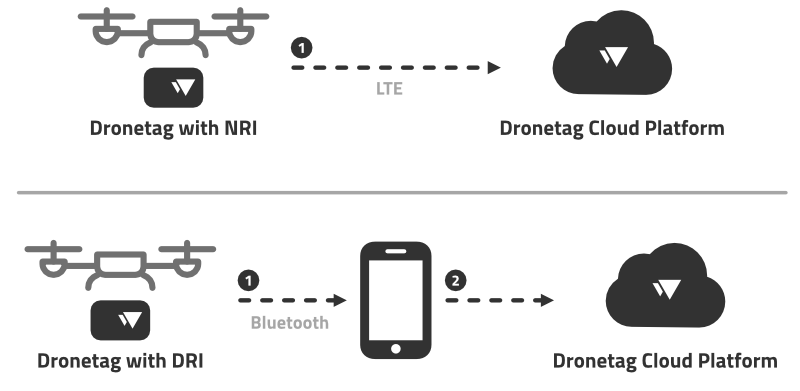
You may wonder how the Flight Synchronization feature differs from the Cloud Flights feature. The NRI-enabled devices (such as Dronetag Mini) transmit the flight telemetry data in real-time to our cloud platform. After your flight finishes, the received flight data are processed, and the flight is available on the cloud platform for you to view immediately.
DRI-only devices (such as Dronetag Beacon or Dronetag BS) cannot provide such functionality because the flight telemetry broadcasts only locally using Bluetooth. Our servers cannot receive the telemetry data, and therefore, the flight cannot be processed and stored on the cloud platform immediately after the flight is finished.
The flight synchronization allows you to store the flight data post-flight by synchronizing the data from the device using your phone.
Using NRI and flight synchronization
You can still use regular NRI flights with the Flight Synchronization feature. Don't worry. The flights won't get duplicated, and you can synchronize the locally stored data even though they have been previously transmitted over the network to the cloud platform. After synchronization, the locally stored data are "added" to the existing flights without duplications.
The flight trajectory in an existing flight will stay the same, or even become more accurate. For a flight which lost the LTE connectivity for a brief period of time — after the flight is finished, the period where the device lost the LTE connectivity will have missing flight data. After you synchronize the flight data from the device, the flight will be updated with the missing data, and the flight trajectory will be more accurate.
Troubleshooting
If you do not find your problem listed below, please see the Support and Troubleshooting Guide page for more troubleshooting options.
I can't find the "Enable flight store" configuration item
If you cannot find the "Enable flight store" configuration item, please check you're using the latest version of Dronetag App, you have the latest firmware installed and your device supports the function.
We are currently working on bringing the Flight Synchronization feature to the Dronetag Toolbox app as well. We will update this page when it's available in both apps.
Synchronizations fail to finish
If the synchronization process fails, please retry the operation. If the problem persists, try restarting the app (or your phone) and retry again. If the problem still persists, there is a chance that the data on the flash memory got corrupted. In this case, please navigate to: My devices › Device detail › Troubleshooting and tap both the "Clear offline flight records" and "Clear offline telemetry" items. This will clear the data on the flash memory, and you can try to synchronize the flights again. You will lose your flight history on the device, so please perform this step as a last resort.
Synchronization is taking too long
Large amounts of flight data stored in the memory can take up to a few minutes to transfer to your phone.
Alert zones
This is a legacy function (still working in on premise setups). Please switch to the new Notifications function.
Alert zones let you define geographic areas to limit where the local detection alerts will be triggered. Zones are defined with GeoJSON and imported in the app UI. Only Polygon and MultiPolygon features are supported.
How the app uses zones
When a detection falls inside a defined zone, the system treats that detection as being within that zone. Each zone is treated separately and you will receive an alert for each of the zones (if you use overlapping zones).
Please keep in mind that the legacy alert zones are only local detection alerts. Defined alert zones are not synchronized with the account and work only in your browser/phone on your device. For server-based notifications, use the new Notifications function.
Step-by-step — create and import an alert zone (recommended workflow)
Create the GeoJSON
- Open a GeoJSON editor such as https://geojson.io
- Draw one or more polygons using the drawing tools (or paste coordinates directly)
- Ensure each polygon/area is represented as a Feature and the document is a FeatureCollection
Add properties
-
Add a
propertiesobject for each feature and include thenameandfillkeys if you want a custom label and color. Other properties are not supported. Example:"properties": {
"name": "No-Fly Zone A",
"fill": "#FF0000"
} -
namemust be a string.fillshould be a hex color string (#RRGGBB)
-
Export / copy GeoJSON
- Copy the entire FeatureCollection JSON from the editor (do not copy just a single geometry)
Paste into the app
- In the app go to Profile > Alerts and scroll to the bottom
- Paste the full GeoJSON into the GeoJSON text field
The zone(s) should appear on the map.
Minimal valid example
{
"type": "FeatureCollection",
"features": [
{
"type": "Feature",
"properties": {
  "name": "No-Fly Zone A",
  "fill": "#FF0000"
},
"geometry": {
"type": "Polygon",
"coordinates": [
[
[14.42076, 50.08804],
[14.42176, 50.08804],
[14.42176, 50.08704],
[14.42076, 50.08704],
[14.42076, 50.08804]
]
]
}
}
]
}
Fly Now Function
The Fly Now function can be used to quickly start your flight, without planning the flight in advance.
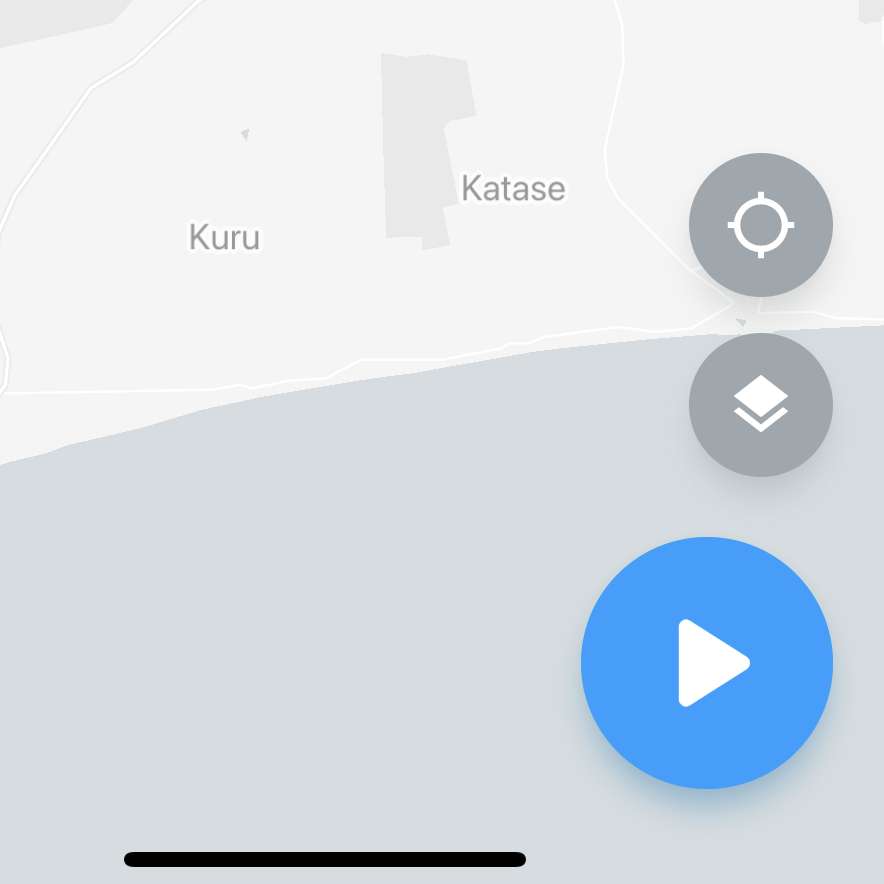
Fly Now from app
Using the Fly button on the dashboard screen of our mobile app, you can quickly create a plan using your current position, default aircraft selection and pre-defined radius of the flight region.
This is effectively the same as you would create the plan normally. You've just skipped the part where you mark the flight region on the map and manually select the aircraft you‘re flying with.
Fly Now from the device
Turn on your device and start the flight with the button (or automatically). This is similar to using Fly Now in the app, with the only difference that the flight plan is performed immediately after its creation.
The default flight plan will be created automatically with a 500m radius circle (current position used for center, the radius can be configured in your user preferences), 120 meters maximum height and your default aircraft (can be set in your profile).
Source pages
Every chapter of this document is a page of the Dronetag help site. Use these addresses to reach the latest version.
- 1Detection Detail & Search Improvementshelp.dronetag.cz/cs/dronetag-app/functions/detection-detail
- 2How to Export and Visualize Detectionshelp.dronetag.cz/cs/dronetag-app/functions/visualise-detections
- 3Push Notificationshelp.dronetag.cz/cs/dronetag-app/functions/notifications
- 4Device Data Sharinghelp.dronetag.cz/cs/dronetag-app/functions/sharing-data
- 5Map Features & Performance Updateshelp.dronetag.cz/cs/dronetag-app/functions/map-features
- 6Known Aircrafthelp.dronetag.cz/cs/dronetag-app/functions/known-aircraft
- 7Label and Color for Detectionshelp.dronetag.cz/cs/dronetag-app/functions/label-and-color-detection
- 8Flight Synchronizationhelp.dronetag.cz/cs/dronetag-app/functions/flight-sync
- 9Alert zoneshelp.dronetag.cz/cs/dronetag-app/functions/alert-zones
- 10Fly Nowhelp.dronetag.cz/cs/dronetag-app/functions/fly-now