
Attaching to the Drone
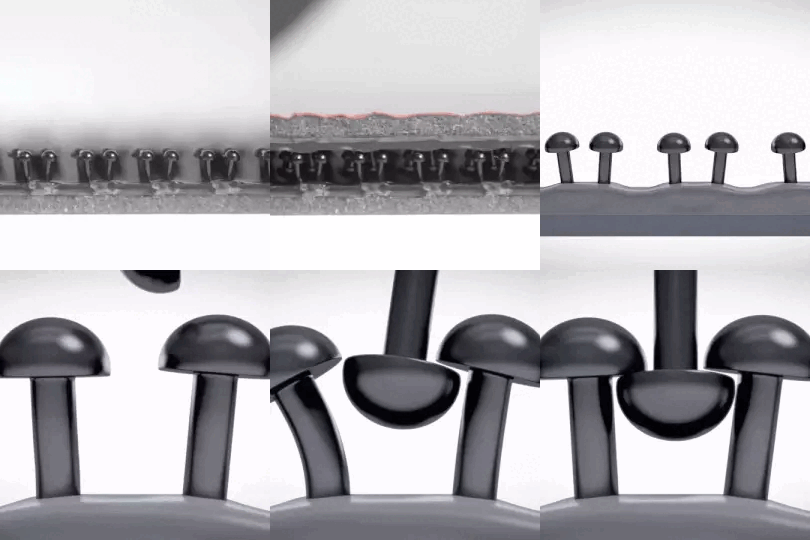
The Beacon uses a 3M Dual Lock reclosable fastener to be quickly & safely attached and detached from your drone. The Dual Lock holds firm when mated. The interlocking mushroom-shaped heads slide past each other to close with a snap and peel apart easily when you need to separate them by simply pulling the strips by hand.
Proper Location
When looking for a suitable location to place the Beacon on your drone, you need to watch out for four potential issues.
- Don't place the Beacon over a curved surface because it might unsnap during the flight.
- Don't place the Beacon on a soft material that can bend during mating (such as plastic covers). The Dual Lock may not hold properly.
- Don't place the Beacon over or close to other electrical components such as the flight controller, IMU, GNSS antennas, or RF transceivers.
- Don't place the Beacon in inaccessible locations. You should have the button and all the LEDs always reachable and visible.
Remember, if you put your Beacon on top of your drone, you can expect a better GNSS signal. When underneath, a better range for Bluetooth DRI. Therefore, the proper location might also depend on your use case.
Dual Lock Counterpart Installation
One part of the Dual Lock is already firmly glued to the bottom of your Dronetag Beacon device. Besides that, we have supplied you with a self-adhesive counterpart, which must be placed on your drone, and a clean alcohol pad to prepare the surface.
- Find the proper surface on the drone for the Dual Lock counterpart.
- Clean the surface with an alcohol cleaning pad.
- Wait three minutes to let the alcohol evaporate.
- Remove the foil from the mating piece and stick it onto the area.
- Wait five minutes, so the glue hardens.
- Snap the device into the mating piece on the drone.
- Ensure the glue on both parts holds firmly by repeatedly removing the device from the drone.
Mating the Beacon with the Drone Counterpart
Mating the Beacon with an aircraft counterpart is fast and easy. Just ensure that the Beacon is centred on the counterpart and push it towards the drone until you feel the mushroom-shaped heads interlock. This is also accompanied by an audible "snap". Before each mating, ensure that both Dual Locks are clean and the mushroom-shaped heads are not bent. When you want to remove the Dronetag Beacon from your drone, pull the device free from one of its corners.
Where to Get a Replacement?
If you need more counterpart pieces, you can order Dual Lock parts on our e-shop. Alternatively, use your local 3M distributor to order a replacement. If you use an alternative distributor, you must ensure that the Dual Lock counterpart is type 3M SJ4570 sized 21x17.3 mm (0.8x0.68 in).
Disclaimer
We kindly advise that our company cannot assume responsibility for the installation of our product by the user or any potential loss incurred as a result. While we strive to provide comprehensive guidance and support, the responsibility for proper installation lies with the user. Should you require any further assistance or clarification, please do not hesitate to contact our customer support team. Your understanding is greatly appreciated.