
Compliance Mode
The Dronetag Toolbox app lets you select a Compliance Mode in the DRI's Configuration screen. This tells the DRI which set of Remote ID requirements it should enforce before allowing your drone to arm and take off.
Compliance Mode applies only to DRI units running the standard DRI firmware. It is not available on DRI units running the DRI GNSS firmware variant.
The available modes are: No Regulation, EU Add-on, EU C Class, US Add-on, US Standard Remote ID, and Japan. Aside from Japan, each of these corresponds to one of the drone integration paths described in the Integration Overview:
| Compliance Mode | Integration Guide |
|---|---|
| EU Add-on | EU Retrofit |
| EU C Class | EU Manufacturer |
| US Add-on | US Retrofit |
| US Standard Remote ID | US Manufacturer |
The Retrofit/Manufacturer guides walk through the hardware and software setup for your integration path, while the Compliance Mode is the corresponding DRI setting that enforces the matching Remote ID requirements.
Once a compliance mode is selected, the DRI continuously checks that the required identification fields, location data, and messages are present and valid before it allows the connected flight controller to arm. Make sure your setup provides every field required for your chosen mode - see the Summary Table below.
Checking Why the DRI Won't Arm
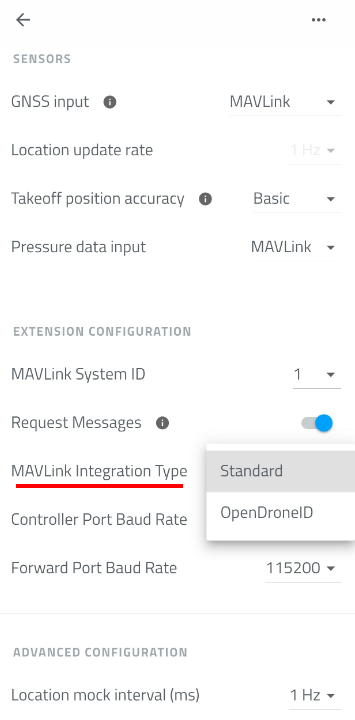
Whether you get an explanation for why the DRI refuses to arm depends on the MAVLink Integration Type:
- Standard - follow the requirements table below carefully for your chosen mode and make sure every required field is provided. The DRI only exposes its status LED, so there's no further explanation if something is missing.
- OpenDroneID - here the DRI has the advantage of reporting a human-readable error over MAVLink whenever a requirement is missing, on the same physical connection that feeds it the OpenDroneID data. To look it up, read the incoming MAVLink messages on that connection (e.g. with a ground control station or a MAVLink inspection tool) and check the OpenDroneID Arm Status message - its error text names the specific missing requirement.
Relation to MAVLink Integration Type
Which compliance modes are available to you depends on the MAVLink Integration Type setting (Configuration screen, Extension Configuration section):
- Standard - the DRI generates the OpenDroneID broadcast internally from its own settings (identification, GNSS/pressure input, etc.). Only the add-on modes can be used with this integration type (EU Add-on and US Add-on), since these represent a Remote ID add-on module rather than a fully integrated system.
- OpenDroneID - the flight controller sends the OpenDroneID data directly to the DRI over MAVLink. All compliance modes are valid with this integration type, including the add-on ones.
Serial Number Override
Every Dronetag DRI ships with its own built-in serial number. For the add-on modes (EU Add-on, US Add-on), this default serial number is used as-is, as long as it is set and in ICAO-compliant format.
For EU C Class and US Standard Remote ID, the drone itself must instead provide its own manufacturer-assigned serial number, which overrides the DRI's default one in the Remote ID broadcast. This value is sent from the flight controller to the DRI in the OPEN_DRONE_ID_BASIC_ID MAVLink message - it is not something you configure in the Toolbox app. See Serial Number Handling in the EU Manufacturer guide or the equivalent section in the US Manufacturer guide for the full requirements, including the recommendation to hardcode it in the flight controller firmware rather than set it from a ground control station.
Because this override is delivered over MAVLink, these two modes require the OpenDroneID MAVLink Integration Type.
Operator ID
Where an Operator ID is required, it is set from the Dronetag Toolbox app rather than from the flight controller. See Set up Identification in the DRI Configuration guide for how to fill it in.
Summary Table
| Compliance Mode | MAVLink Integration Type | Operator ID | Serial Number Override | Operator/Take-off Location | Live Operator Location | Timestamp | Auth (Signature) |
|---|---|---|---|---|---|---|---|
| No Regulation | Standard or OpenDroneID | Not required | Not required | Not required | Not required | Not required | Not required |
| EU Add-on | Standard or OpenDroneID | Required | Not required | Not required | Not required | Not required | Not required |
| EU C Class | OpenDroneID only | Required | Required | Not required | Not required | Not required | Not required |
| US Add-on | Standard or OpenDroneID | Not required | Not required | Required | Not required | Not required | Not required |
| US Standard Remote ID | OpenDroneID only | Not required | Required | Not required | Required | Required | Not required |
| Japan | OpenDroneID only | Not required | Not required | Not required | Not required | Required | Required |
A valid, up-to-date location (position fix), a serial number, and an ICAO-compliant serial number format are required for every mode except No Regulation.
Compliance Modes
No Regulation
No Remote ID compliance checks are enforced. The DRI allows the connected flight controller to arm regardless of identification, location, or messages received.
EU Add-on
Add-on Remote ID mode for the EU. For drones using the Dronetag DRI as a Remote ID add-on module under EU (EASA) rules. See the EU Retrofit guide for full setup.
To arm, the DRI requires:
- A serial number to be set (the DRI's own default is fine)
- The serial number to be in ICAO-compliant format
- A valid Operator ID to be set
- A valid, up-to-date location (position fix)
EU C Class
European C-class compliance (C1–C4). For drones certified into an EU C-class under the Open category. See the EU Manufacturer guide for full setup.
To arm, the DRI requires:
- A serial number to be set
- The serial number to be in ICAO-compliant format
- The serial number to be a manufacturer override (not the DRI's default)
- A valid Operator ID to be set
- A valid, up-to-date location (position fix)
US Add-on
Add-on Remote ID mode for the United States. For drones using the Dronetag DRI as an FAA Remote ID Broadcast Module. See the US Retrofit guide for full setup.
To arm, the DRI requires:
- A serial number to be set (the DRI's own default is fine)
- The serial number to be in ICAO-compliant format
- A valid take-off location for the operator (control station position at take-off)
- A valid, up-to-date location (position fix)
US Standard Remote ID
Full FAA Standard Remote ID compliance. For drones manufactured as FAA-compliant Standard Remote ID aircraft. See the US Manufacturer guide for full setup.
To arm, the DRI requires:
- A serial number to be set
- The serial number to be in ICAO-compliant format
- The serial number to be a manufacturer override
- A valid, live operator location (continuously updated, not just a fixed take-off point)
- A current timestamp in the broadcast data
- A valid, up-to-date location (position fix)
Japan
Remote ID mode for Japan. For drones operated under Japanese drone identification regulations.
To arm, the DRI requires:
- A serial number to be set
- The serial number to be in ICAO-compliant format
- The serial number type to be set to CAA registration ID
- A current timestamp in the broadcast data
- A valid authentication (signature) message to be present
- A valid, up-to-date location (position fix)